I plan to experiment with a couple of services on this server and want to setup a centralized login solution and single-sign-on. Kanidm appears to be the most lightweight solution, that supports my needs, which right now are OIDC and LDAP, even though, LDAP is just a read-only gateway in Kanidm.
In NixOS, there is a patched version of Kanidm, that allows to provision secrets declaratively, due to Kanidm being somewhat oppinionated when it comes to the source of truth and the quality of secrets. The patches are fairly small and have been ported to newer releases of Kanidm by the NixOS community. I prefer to stay on upstream anyway and don’t expect to gain much from the provisioning patches for my pet project. I may change my mind on that later.
Some reading I found for Kanidm on Nixos: Kanidm LDAP guide, using the provisioning patches and a git repository with a Kanidm NixOS configuration, which is pretty much what I chose to do. Here is my kanidm.nix:
{
  config,
  pkgs,
  ...
}:

{
  services.kanidm = {
    package = pkgs.kanidm_1_10;

    client.enable = true;
    client.settings.uri = config.services.kanidm.server.settings.origin;

    server = {
      enable = true;
      settings = {
        version = "2";
        domain = "id.filts.net";
        origin = "https://id.filts.net";

        bindaddress = "127.0.0.1:8443";
        http_client_address_info.x-forward-for = [ "127.0.0.1" ];

        tls_chain = "/var/lib/acme/filts.net/fullchain.pem";
        tls_key = "/var/lib/acme/filts.net/key.pem";
      };
    };
  };

  users.users.kanidm.extraGroups = [ "acme" ];

  services.nginx.virtualHosts."id.filts.net" = {
    forceSSL = true;
    useACMEHost = "filts.net";

    locations."/" = {
      proxyPass = "https://${config.services.kanidm.server.settings.bindaddress}";
    };
  };

  security.acme.certs."filts.net".reloadServices = [
    "kanidm"
  ];

}
The main difference is that I am using a wildcard certificate. server.settings is an interesting option. The module does not define keys like version. Instead, everything under settings generates a toml file. One day, I hope to know enough nix, to understand what is going on there. So, those settings closely follow Kanidm’s example server.toml. By default, the module sets db_path to "/var/lib/kanidm/kanidm.db". Like many services, Kanidm supports sequential major version upgrades, so it is wise to set the package version explicitly.
Kanidm is set up behind nginx as a reverse proxy, that terminates TLS. However Kanidm requires the certificate at least for LDAPS, which is not enabled yet. Likely Kanidm won’t even start without TLS set up. With this setup, TLS will be done twice. Once on the reverse proxy to the outside, and then between the reverse proxy and Kanidm.
Let’s try it out. Without the provisioning patches, I have to retrieve the admin secrets using the client cli. By default, there is an admin user for server administration
kanidmd scripting recover-account adminand an idm_admin user for managing users of the system.
kanidmd scripting recover-account idm_adminWith the latter, I can login as idm_admin to create my user, m, and create a reset-token:
kanidm login --name idm_admin
kanidm person create m "Michael Weiß"
kanidm person credential create-reset-token m
The person can use one of the following to allow the credential reset
Scan this QR Code:
█████████████████████████████████████████
█████████████████████████████████████████
████ ▄▄▄▄▄ ██▀ ██▄▀█▀▀▄ ▀▄██ ▄▄▄▄▄ ████
████ █ █ █ ▀ ▀▀█▄ ▄▀▀ ▄▄▀▄█ █ █ ████
████ █▄▄▄█ █ ▄▀▀█ ▄▄█▄▄█▀ ▄▀█ █▄▄▄█ ████
████▄▄▄▄▄▄▄█ ▀ ▀▄█ █ █▄▀▄▀▄█ █▄▄▄▄▄▄▄████
████▄▀▄ ▄▄▀▀█ ▀█ █ ▀ █▀ ▀▄█ ▄ █▀████
████ ▄▄█▄▀▄██ █▀ ▄ ███▀▀▀▀▄▀██ ▀ ▀████
████ ▀█▀▀▄ ▀▀▄▄ ▀▄ █ ▀▀▀▀▄▀▀ ▀█▄ ▀▀ ████
█████ ▀▄█▄▄█▄█ ▀▀▄▀▄██▄▀▄ ▄▀ ▀█ ▄█████
████▀▀█ █ ▄▄ ▄▀▀▀█▄█▀▄ ▀ ▀▄▄▀ ▄▀▀█ ████
████▀█▄ ▄▀▄▀██ ▄▄▄█▄▄▄██ ▀ ▀▄ ▀ ▀ ▀████
████▀ ▄███▄▄ ▄▄▀▀█▄▄ █▀▀▀█ ▄ ▀█▄ █▄ ████
████ █ ▄ ▀▄▀▀▀ █ ▄▀▄█▀▄▀▀██▀▄▀▀█▀ ▀████
████▄█▄█▄▄▄█ █ ▄ ▀ ▄ ▄█▀▀██▄ ▄▄▄ ▄▀█ ████
████ ▄▄▄▄▄ █▀▀▄ ██ █▄▀▀ ▄ █▄█ ▀ ▄█████
████ █ █ █ ▀▄██▀▀▄▄▄▄ ▄█▀█ ▄▄ █ ▀████
████ █▄▄▄█ █▄▄▀▀ ▄█▄ ▄ ▀█▀▄▄▄█ ▄▀ ██████
████▄▄▄▄▄▄▄█▄███▄▄▄▄█▄████▄█▄██▄█▄█▄█████
█████████████████████████████████████████
▀▀▀▀▀▀▀▀▀▀▀▀▀▀▀▀▀▀▀▀▀▀▀▀▀▀▀▀▀▀▀▀▀▀▀▀▀▀▀▀▀
This link: https://id.filts.net/ui/reset?token=yqqwx-b0u3g-23kj3-gq76z
Or run this command: kanidm person credential use-reset-token yqqwx-b0u3g-23kj3-gq76z
This token will expire at: 2026-08-05T19:02:19+02:00Following that link, one can set passkeys or a password: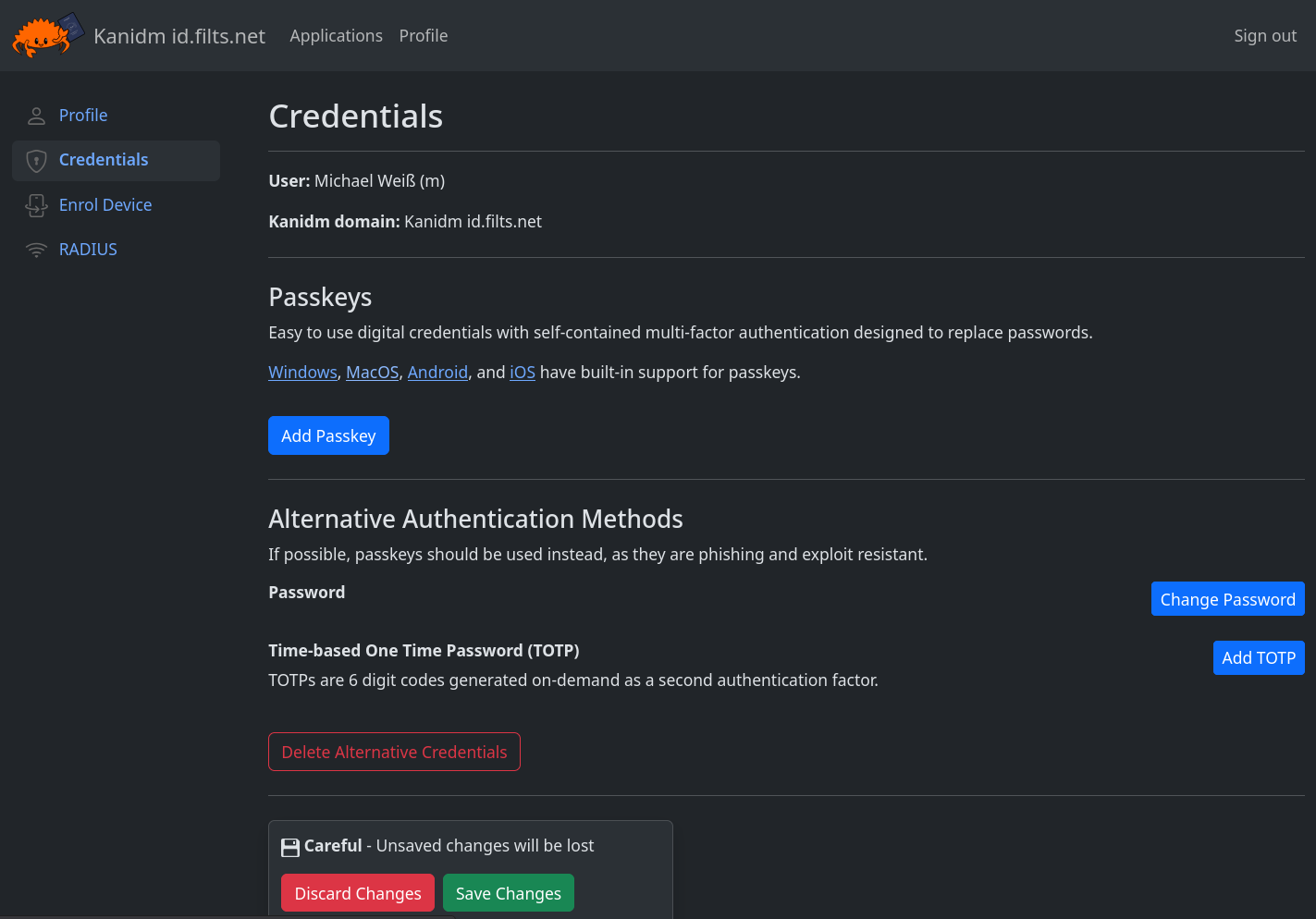
To my surprise, setting a password was not enough for Kanidm. It required to also set TOTP, which is a little much for my personal experiments, imho. Luckily, that behaviour can be configured:
kanidm group account-policy credential-type-minimum idm_all_persons anyI then could remove TOTP from my account using
kanidm person credential update mWith that, I can now login with only a password. I also added a passkey from my Android device. No surprises there.
Lastly, I confirmed that the correct client IPs appear in the logs:
journalctl -fu kanidm.serviceSo far so good. Configuring it to actually do something useful will be a matter for future posts.
Shortly after I wrote this article, Kanidm 1.11 has been released. Nix showed a helpful notice upon rebuild:
evaluation warning: kanidm 1.10 is deprecated and will reach end-of-life on 2026-08-31

                    Please upgrade by verifying `kanidmd domain upgrade-check` and choosing the
                    next version with `services.kanidm.package = pkgs.kanidm_1_x;`

                    See upgrade guide at https://kanidm.github.io/kanidm/master/server_updates.html
I have not decided on a backup solution, yet, so all there was to do was running the upgrade check:
kanidmd domain upgrade-checkSince that passed, I bumped the package version to kanidm_1_11, rebuilt and ran the upgrade-check again.